

Interactive demoExplore with sample content. Nothing is published.About this demo
Monkey404 vs Publer.
How do client workspaces and reviews work?
Monkey404 is in private beta, with publishing for eligible Facebook, Instagram and LinkedIn accounts. The public demo lets you try sample workflows without connecting an account.

The decision that matters
How do client workspaces and reviews work?
Publer describes separate workspaces, internal notes, client previews and a two-tier approval system. Monkey404’s current beta lets a client approve a saved version or request a change through a private review link. Compare the complete journey with the work your team needs.
Checked 2 October 2026 against Publer’s own product information. Features, plans and availability can change.
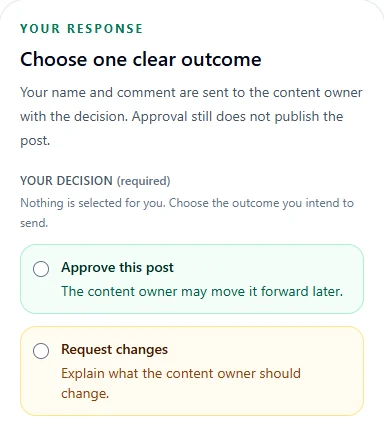
What Monkey404 offers today.
Workspace reports describe activity in Monkey404. External social-network analytics and self-serve billing are not currently available.
Explore the workflow using sample content. No signup, payment or social connection is required.
A PRACTICAL COMPARISON
Keep two client workspaces separate.
Use a café and a salon as sample clients. Switch between them, leave feedback on one post and check the other client’s calendar before scheduling.
Questions to take into your demo
- How are client accounts and collaborators assigned?
- Who gives each of the two approval decisions?
- Can a reviewer identify the exact post being discussed?
What you can try in Monkey404 now
Try preparing a post, sending it for review and choosing a publishing time. Approval applies to the version your client saw. After sending a post, Treehouse waits for a result or verified completion before marking it as published.
Invited workspaces can use Banana Studio’s writing assistant and publish to eligible Facebook, Instagram and LinkedIn accounts. Social-network analytics and self-service billing are not available. The public demo uses sample content and does not offer paid pilots.
Try the client-review sample