Monkey404

Interactive demoExplore with sample content. Nothing is published.About this demo

FOR SMALL BUSINESSES & SOCIAL TEAMS

Write, review and
schedule your social posts.

Write posts, get client feedback and choose when to publish, all in Treehouse, your Monkey404 workspace.

Explore first. No account or social connection needed.

Patch holds his camera at an open workbench, beside a matching social-post preview, client-feedback check and content calendar.
Patch’s creator studioIllustrated workflow · your decisions

Facebook · Instagram · LinkedIn

Check publishing availability for your workspaceExplore available channels
See available channels

FIND YOUR CHANNEL

Choose your channels.
Check what’s available.

Facebook and Instagram publishing are available for eligible connected accounts. LinkedIn is available to every workspace with an eligible connected account. Check each channel’s status below before planning a post.

Keep the post and the feedback in one place.

Treehouse is where you and your team work on your posts. See the actual workspace ↗

  • 01 / IN THE TREEHOUSEClient review

    Clients review through a link.

  • 02 / IN THE TREEHOUSEContent planning

    The caption and media stay together.

  • 03 / IN THE TREEHOUSEClient workspaces

    A separate workspace for each client.

  • 04 / IN THE TREEHOUSEPublishing status

    Check whether your post actually published.

Find the latest draft without asking around.

The caption, photos and client’s comments stay with the post, so whoever picks it up next has what they need.

Make this demo yours

This is a preview. Your details stay on this page and are used with the selected sample artwork, channel and time.

Illustrative walkthrough · sample content, nothing is published

01 / PLAN

Put your post together.

Write the caption, attach your photos and choose the account. Save everything in one draft, ready to share for review.

Patch checks cinnamon buns at a miniature café counter.

PATCH AT WORKThe morning bake

No hunting through messages for the right photo or latest caption.

Explore content planning Next: Review

02 / REVIEW

Send your client the version you want checked.

Send a private review link. Your client can approve the post or ask for changes without creating an account.

Patch reviews the illustrated post with a pencil and feedback card at the café.

PATCH AT WORKReview the details

Their decision stays with that version. Approval does not publish the post.

See how review works Next: Schedule

03 / SCHEDULE

Choose when each post should go out.

Give the post a date, time and connected account. See your publishing plan alongside drafts and posts waiting for review.

Patch points to the post on a miniature content calendar at the café.

PATCH AT WORKGive it a date

Facebook Pages · Instagram · LinkedIn — account eligibility applies.

Explore the calendar Next: Check

04 / CHECK

Check what happened after scheduling.

Check the status after the scheduled time. You’ll see whether the post is waiting, has been sent, is confirmed published or needs attention.

Patch inspects the illustrated post and its result with a magnifying glass at the café.

PATCH AT WORKCheck the result

The post is marked as published once a result is received or an authorised team member verifies that it went live.

Understand publishing status Try a client review

TAKE THE CLIENT’S SEAT

What would you tell the café?

Harbour Café has a post ready to review. Try each decision to see how feedback stays attached to this version.

Interactive sample · stays in this browser. Nothing is submitted, saved or published.

See the full client-review process ↗
Harbour CaféFacebook Page · Version 1
Awaiting review
Fresh cinnamon buns this weekend. Pop in early and pick your favourite window seat.
Illustrated example: Patch sets cinnamon buns on a miniature café counter.

▧ Illustrated sample: the morning bake

Review the post before it goes out.

A client can approve this version or request a change. No client account is needed.

Take a look inside Treehouse.

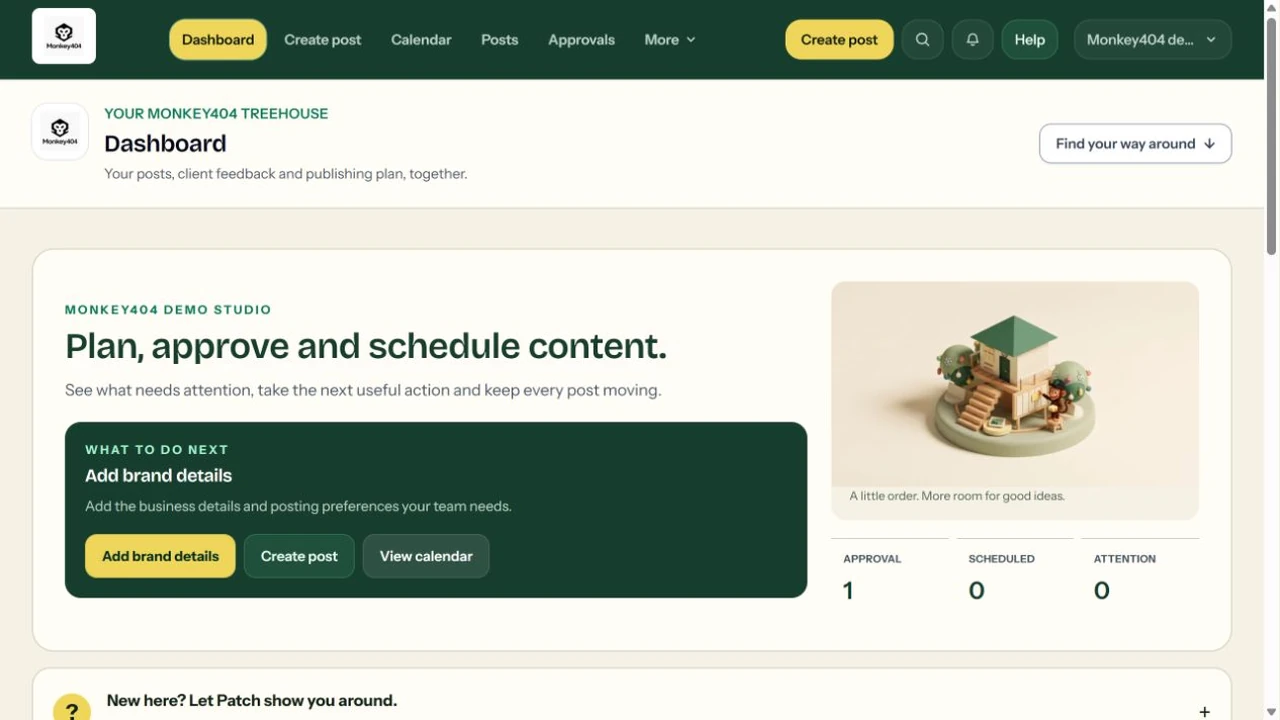
Treehouse is in private beta. Invited members can write drafts, preview posts, ask clients for feedback and schedule to eligible connected accounts. Each post shows its publishing status, including whether it’s still waiting for confirmation.

THE TREEHOUSE / YOUR WORKSPACEACTUAL INTERFACE · EXAMPLE CONTENT
The actual Monkey404 workspace showing drafts, approvals, scheduled posts, and Patch’s next-action guide.
Actual product screen with example content and illustrative dates. Open a larger image

INSIDE THE DEMO

Is Monkey404 a fit for your team?

Try a Facebook or Instagram example to see how a post moves through Treehouse. The demo uses sample accounts and doesn’t connect to your social networks.

Check channel requirements ↗
For your business
Keep captions, media, feedback and your publishing plan together. Start with Facebook Pages and eligible Instagram Business or Creator accounts.
For a few clients
Give each client their own workspace and switch between them. Posts, media and approvals stay separate. Workspace and team limits have not been announced.
If you need more channels
LinkedIn publishing is available to every workspace with an eligible connected account. Use text or one JPG/PNG image, with up to 3,000 caption characters including the Monkey404 footer. Other networks are planned and are not available for customer publishing yet. Banana Studio’s writing assistant is available to invited workspaces. Finished image and video generation are not available.

Questions about Monkey404

What you can try here and how beta access works.

Can I use this without an account?

Yes. Choose a business example and explore the workflow with sample content. This interactive demo does not create an account, send an invitation request or connect social channels.

Can I explore before connecting my accounts?

Yes. Try the review sample above without signing in. Existing beta members can sign in to their workspace. New access is controlled while customer onboarding is being completed; send an enquiry to discuss your needs.

Do my clients need a Monkey404 account?

No. A private review link lets a client approve a specific version or request changes without creating an account. The workspace team controls scheduling separately.

Where can I check privacy and account access?

Read our privacy notice and data deletion guide. This demo uses sample accounts; no social accounts are connected.

Can I buy a subscription here?

Not yet. You can explore the walkthrough and enquire about access. Paid plans are being prepared; no checkout or automatic subscription is available.

Does a client’s approval publish the post?

No. The decision belongs to the version they reviewed. Publishing is a separate step, so an approval is not a live post.

How will I know if a post needs attention?

Check the post’s status. Treehouse shows scheduled posts, posts awaiting confirmation and confirmed results separately. If something fails or stays unconfirmed, open it to see the next step.

COME ON UP

Try a post for a business like yours.

Choose a sample business and follow its post through the demo. You can explore without signing up.

Try the demo

Interactive demo · No signup or social connection.

Read about access and pricing ↗

LET’S TALK CONTENT

Tell us what you’re looking for.

Tell us about your business, the posts you manage and where you’re getting stuck. We’ll reply to the email address you give us.

The walkthrough is open to explore. Sending a message does not create an account or connect your social channels.

We use these details to respond to your message. Please don’t include passwords or sensitive information. How we handle your information.

Read how to use Banana Studio, prepare posts, get client feedback and check publishing results. The guide includes current limits and features still being developed.


Explore the feature guide →